
 English
  Español
  Deutsch
  Français
  Português
  Italiano
  Nederlands
  Polski
  Svenska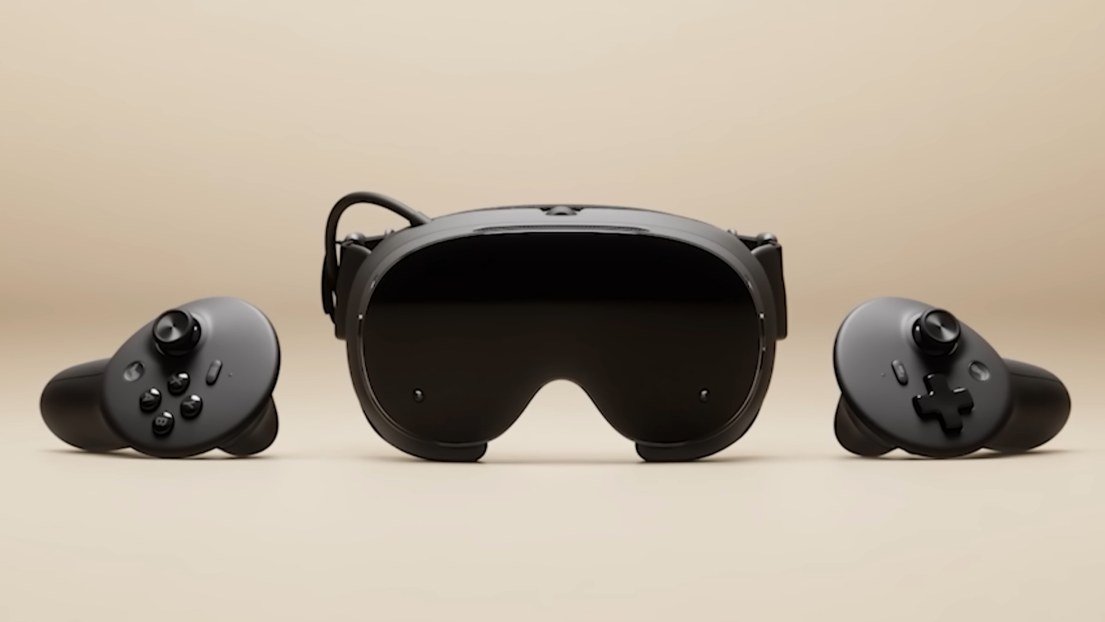
The Steam Frame is Valve’s virtual reality headset, and it arrives with an idea that sets it apart from everything else in the category: it’s not built for VR alone. It’s a wireless headset with controllers that can run games on its own, stream anything from your Steam library from your PC, and even launch regular flatscreen games on a giant virtual display. VR and traditional gaming, in the same device.
Valve released it on September 14, 2026, almost ten months after unveiling it, with two storage options and one very specific technical pitch: eye tracking that sends bandwidth exactly where you’re looking. That’s the piece that explains the rest of the design, and the one that decides whether it’s worth it over the obvious alternative, the Meta Quest 3.
What exactly is the Steam Frame
Valve describes it as a wireless headset-and-controller set built for both regular games and VR, designed with streaming in mind. That last part is the key: it’s optimized to stream from a PC, not replace one.
But it also works standalone. It packs its own processor and SteamOS, and Valve counts more than a hundred verified games that run natively on the headset at launch, with the list growing. And one detail that matters for anyone new to VR: Half-Life: Alyx comes bundled and gets claimed during headset setup.
In short: three ways to play. Native VR games on the headset, games streamed from your PC — including non-VR titles — and regular games on a floating screen.
Design and weight: the battery moves to the back
190 g core · 435 g complete
The most visible design decision is how the weight is distributed. The front block, with the displays, lenses, and electronics, weighs 190 grams. The 21.6 Wh battery sits at the back, built into the strap. Fully assembled — core, strap, facial interface, and battery — the whole thing comes to 435 grams.
The number matters less than where it sits. A front-heavy headset pulls your face down, which is what wears you out in long sessions; putting the battery at the back counterbalances it and spreads the load across your head.
Audio also lives in the strap: two speakers per ear and a dual microphone array.
Displays and lenses
2160 × 2160 LCD per eye · 72 to 120 Hz · pancake lenses · up to 110°

Two 2160 × 2160-pixel LCD panels per eye, with a refresh rate of 72 to 120 Hz and a 144 Hz mode that Valve labels experimental. The lenses are pancake lenses, the type that lets the panel sit closer to your eyes and keeps the headset more compact, and the field of view reaches 110 degrees.
It’s worth reading those two refresh numbers carefully. 120 Hz is the official ceiling; 144 Hz exists, but tagged as experimental, so it’s not something to count on in every game. And these are LCD panels, not OLED: more brightness and no risk of burn-in, in exchange for blacks that don’t quite reach true black.
The trick that explains everything: eye tracking and foveated streaming
Inside the headset are two cameras that track eye movement. Valve uses them for one very specific purpose: foveated streaming. When streaming from a PC, the headset dedicates most of the available bandwidth to the area you’re actually looking at, and less to the periphery, where the human eye barely picks up detail anyway.
The practical payoff is more quality where it actually shows, over the same connection. The bottleneck in wireless VR has never been PC power — it’s the link: compressing and sending two high-resolution images at 90 or 120 frames per second with no cables. Distributing that bandwidth more intelligently attacks the problem head-on.
And Valve doesn’t leave the link to your home router. The Steam Frame comes with dual-radio Wi-Fi 7 2×2 — one connection dedicated to streaming and another for regular network traffic at the same time — and ships with a 6 GHz wireless adapter that plugs into your PC, a Steam Machine, or a Steam Deck. Streaming runs over its own dedicated link instead of competing with every other device in the house for the same Wi-Fi.
Playing without a PC: Snapdragon, SteamOS, and game translation
Snapdragon 8 Gen 3 · 16 GB of memory · 256 GB or 1 TB · microSD up to 2 TB
The brains are a 4nm Qualcomm Snapdragon 8 Gen 3 with an eight-core CPU, paired with 16 GB of unified memory. There are two storage tiers, 256 GB and 1 TB, plus a microSD slot for expanding up to 2 TB — a rarity for a headset.
This is the most technically ambitious part. The system runs SteamOS on an ARM chip, but the vast majority of Steam games are built for Windows on x86 processors. Valve solves this with Proton, its compatibility layer, which lets x86 Windows games run on the headset’s ARM version of Linux.
It’s worth being upfront about what that means: translating games from one architecture to another costs performance. That’s why the verified label matters. The 100-plus verified games at launch are the ones Valve guarantees run well natively; for the rest of the library, streaming from a PC is the intended path.
Controllers: VR controllers and gamepad in one
6DoF tracking · TMR magnetic sticks · one AA battery, roughly 40 hours
The controllers offer full six-degrees-of-freedom tracking with motion sensors, capacitive finger sensing, and haptic feedback. But the interesting detail is something else: they’re built to have the same controls as a traditional gamepad. The d-pad sits on the left controller and the face buttons on the right, so together they work as a gamepad for playing regular games without picking up a separate controller.
The sticks use TMR magnetic sensors, which measure position without physical contact: Valve chose them for precision, responsiveness, and reliability, and it’s the technology meant to fight drift, that phantom stick movement that shows up with use. Each one runs on one replaceable AA battery, lasting around 40 hours.
Passthrough, sensors, and an expansion port
The headset tracks itself using four external monochrome cameras that follow both your head and the controllers, plus an infrared illuminator so it works in dim rooms.
Passthrough — seeing the room without taking the headset off — is monochrome, at 1280 × 1024. It’s enough to get your bearings, grab a controller, or avoid tripping over the couch, but not for true mixed reality, where virtual objects blend with a full-color view of the room. It’s the clearest tradeoff in the design, and it makes sense once you think of the headset as a gaming machine rather than a mixed-reality device.
There’s also a detail for anyone thinking long-term: an accessible expansion port with two 2.5 Gbps camera interfaces and a PCIe Gen 4 lane. Valve leaves the door open for modules that add features the headset doesn’t ship with out of the box.
What’s in the box and what you buy separately
The box includes the headset, the two controllers, and the wireless adapter for your PC. What’s not included, and it’s worth knowing upfront, is the power supply: Valve sells a 45 W charger with a 2.5-meter cable separately.
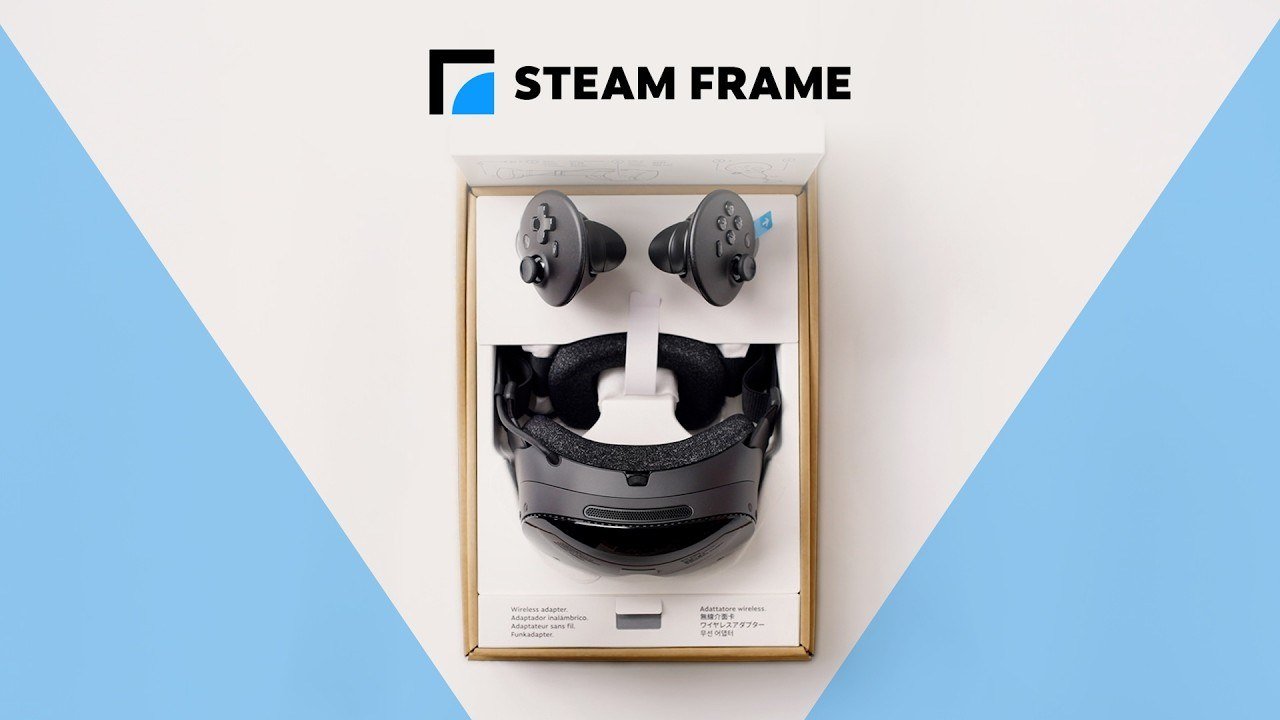
Valve also sells two kits. The ergonomic accessories kit includes two hand straps that double as battery covers, a top strap for the headset, and a larger light blocker. The replacement kit includes a facial interface pad, a head pad, and the standard light blocker.
The top strap deserves a special mention: on a headset with the battery at the back, it’s what keeps the whole thing from sliding down during long sessions.

Availability
It’s sold directly through Steam in the United States, Canada, the United Kingdom, Europe, and Australia, and through an authorized distributor in Japan, Taiwan, and Hong Kong, with South Korea on the way.
Purchases go through a reservation system, the same one Valve used for the Steam Machine to keep scalpers out: sign-ups open through September 17, a single drawing sets the order of the queue and waitlist, and the first emails with purchase access go out starting September 18, as units become ready to ship.
Performance comparison: Steam Frame vs. Meta Quest 3
The comparison everyone’s going to make is with the Meta Quest 3, the reference standalone headset. Both are wireless, both can play without a PC, and both use pancake lenses, but they’re built around very different priorities, and the spec sheet makes that pretty clear.
| Steam Frame | Meta Quest 3 | |
|---|---|---|
| Processor | Snapdragon 8 Gen 3 (4nm) | Snapdragon XR2 Gen 2 (4nm) |
| Memory | 16 GB unified | 8 GB LPDDR5 |
| Storage | 256 GB or 1 TB, expandable via microSD up to 2 TB | 128 GB or 512 GB |
| Displays | 2160 × 2160 LCD per eye | 2064 × 2208 LCD per eye |
| Pixels per eye | 4,665,600 | 4,557,312 |
| Refresh rate | 72 to 120 Hz (144 Hz experimental) | 90 to 120 Hz |
| Lenses | Pancake | Pancake |
| Eye tracking | Yes, with foveated streaming | No |
| Passthrough | Monochrome, 1280 × 1024 | Color, 4 MP RGB camera |
| Weight | 435 g complete (190 g core) | 515 g |
| Battery | 21.6 Wh, in the rear strap | About 18.9 Wh (4,879 mAh at 3.87 V) |
| Connectivity | Dual-radio Wi-Fi 7 2×2 with included 6 GHz adapter | Wi-Fi 6E |
| Controllers | AA battery, roughly 40 hours | AA battery |
Playing without a PC: more memory, but with a translation tax
The biggest gap on the spec sheet is memory: 16 GB versus 8 GB, double. On a standalone headset that shows up in load times, in games with large worlds, and above all in what’s needed for the translation layer the Steam Frame uses to run Windows games.
But that advantage needs context. The Snapdragon 8 Gen 3 is a high-end phone chip; the Quest 3’s XR2 Gen 2 is built specifically for VR, and the Quest library is compiled for its architecture. The Steam Frame, on the other hand, runs a good chunk of its catalog by translating x86 games to ARM, and that eats into the margin. In practical terms: in verified games, the extra memory gives it an edge; outside that list, the Steam Frame’s strength is streaming, not native play.
Resolution: essentially a tie
The Steam Frame pushes 4,665,600 pixels per eye and the Quest 3 pushes 4,557,312: barely 2% more. In rendering load, it’s a technical tie, and neither one gains noticeably sharper image quality from pixel count alone. What actually changes the picture lies elsewhere.
Streaming from a PC: here’s where the real difference is
This is where the Steam Frame plays in a different league, for two reasons that stack together. First, foveated streaming: by knowing where you’re looking, it concentrates bandwidth on that spot. Same connection, more quality exactly where the eye notices it. The Quest 3 has no eye tracking, so it simply can’t do this.
Second, the dedicated link. The Steam Frame ships with its own 6 GHz adapter and a radio reserved just for streaming; the Quest 3 relies on your home Wi-Fi, shared with everything else, and on how well or poorly your router is placed. For anyone who wants to play their PC library in VR with no cables, this is the real reason to pick the Steam Frame, and it’s exactly the use case Valve built it for.
Mixed reality: Quest 3 wins, no contest
The Quest 3’s passthrough is in color and it has a depth sensor; the Steam Frame’s is monochrome. If the interest is mixed-reality apps, games that blend virtual elements with the room, or seeing your surroundings naturally, the Quest 3 is the clear pick. The Steam Frame gives that up on purpose.
Comfort and battery life
The Steam Frame weighs 80 grams less (435 g versus 515 g) and, on top of that, carries its battery at the back for a more balanced fit in long sessions. On paper, its battery has more capacity — 21.6 Wh versus roughly 18.9 Wh — but Valve hasn’t published battery-life figures, and it’s driving a more powerful chip with double the memory, so capacity alone doesn’t mean it lasts longer. Real-world numbers will have to wait.
Verdict
The Steam Frame isn’t trying to out-Quest the Quest 3. It’s a headset built for people who already have their library on Steam and want to play it in VR with no cables and the best possible image quality over a wireless link. For that job, eye tracking with foveated streaming plus a dedicated 6 GHz adapter is the strongest combination out there right now, and the lighter weight with the rear-mounted battery helps in long sessions.
Where it fits less well: for anyone chasing mixed reality, who’ll get a better experience from the Quest 3’s color passthrough, and for anyone who mainly wants to play without a PC, since outside the verified games the architecture translation takes its toll. And keep in mind that the charger is sold separately, along with a lottery-based reservation system that doesn’t guarantee a unit in the first shipments.
If your PC is the center of how you game, this is the headset Valve hadn’t made in years. If it isn’t, the Quest 3 is still the more well-rounded pick.